6 Text-to-Video Prompts for World Cup 2026 Fan Clips (No Match Footage Needed)
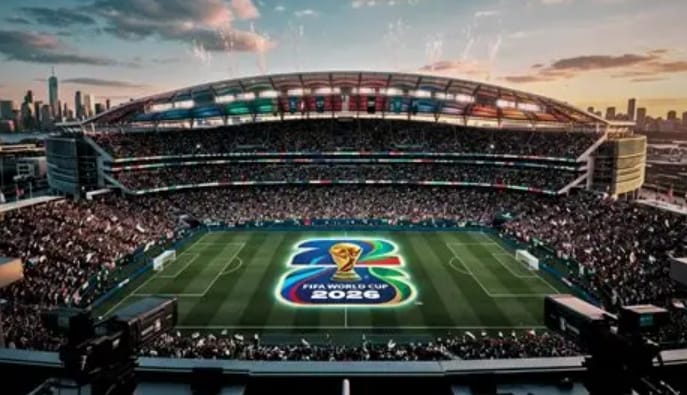
The FIFA World Cup 2026 is one of the biggest moments on the global sports calendar — and fans are already looking for fresh ways to join the conversation online. Short-form video is where that energy lives: goal reactions, jersey reveals, stadium atmospheres, and celebration edits that feel cinematic, not generic.
If you want to create those clips without filming gear or editing software, VidpexAI makes it straightforward. As an all-in-one AI-powered content creation platform, VidpexAI lets you generate AI videos, AI images, and AI avatars from text or uploaded images — ideal for short-form video production, e-commerce marketing, and everyday content creation. With its AI text to video generator free workflow, you can turn a written scene into a polished clip in seconds.
This guide shares 6 copy-and-paste FIFA World Cup 2026 text to video prompts, practical tips, and answers to the questions users actually ask when building their first World Cup fan video.
Best FIFA World Cup 2026 Text to Video AI Prompts
Below are six AI prompts optimized for VidpexAI’s text to video AI engine. Paste any prompt into the prompt box, adjust duration or style if needed, then click Create.
Each prompt includes subject, action, setting, camera movement, and atmosphere — the details that help a free AI video generator from text produce stronger results.
Prompt 1: FIFA World Cup 2026 Stadium Tunnel Entrance
A confident football player in a modern national team jersey walks through a massive FIFA World Cup 2026 stadium tunnel. Smoke and golden light fill the entrance as thousands of fans cheer from the stands, waving flags and scarves. The camera tracks from behind in slow motion, then cuts to a front-facing hero shot. Cinematic sports documentary style, dramatic stadium lighting, ultra-realistic crowd energy, 4K quality, 9:16 vertical format for social media.
Best for: Pre-match hype, team support reels, “game day arrival” edits.
Prompt 2: World Cup Fan Video Maker — Victory Celebration
A passionate football fan wearing a national team jersey stands in a packed stadium after a World Cup win. He raises both arms and shouts in celebration as fireworks explode above the pitch. Confetti rains down, flags wave across the stands, and the camera slowly pushes in on his emotional reaction. Realistic crowd atmosphere, cinematic slow motion, warm stadium lights, ultra-detailed 4K sports 16:9 video.
Best for: Post-match reactions, fan community posts, celebration montages.
Prompt 3: FIFA World Cup 2026 Video Maker — Trophy Walk
A football player in a clean home kit walks toward the FIFA World Cup trophy on a glowing pedestal at the center of a stadium. Spotlights follow from above as fans cheer in the blurred background. The camera starts behind the player, then arcs around to reveal the trophy’s golden reflection. Dramatic depth of field, luxury sports commercial look, ultra-realistic details, 4K cinematic video.
Best for: Dream-final scenarios, motivational sports content, trophy-themed fan edits.
Prompt 4: World Cup Video Game–Style Match Intro
A high-energy football match intro inspired by a world cup video game broadcast. Quick cuts show a stadium aerial view, team flags, flashing scoreboard graphics, and a player sprinting onto the pitch. Dynamic camera shakes, bold lighting, broadcast-style overlays, and an adrenaline-filled sports atmosphere. Fast-paced cinematic editing, realistic stadium environment, 4K quality, vertical short-form format.
Best for: Gamified sports content, match-day intros, esports and football crossover posts.
Prompt 5: World Cup Fan Video Maker — Flag Walk Through the Crowd
A confident football fan carries a large national flag over her shoulders while walking through a sea of cheering supporters outside a FIFA World Cup 2026 stadium at night. Colorful smoke flares, waving banners, and phone lights create a vibrant atmosphere. The camera follows from behind, then reveals her smiling face. Cinematic tracking shot, realistic crowd motion, dramatic night lighting, 4K sports commercial quality.
Best for: Fan pride content, travel-to-tournament vlogs, supporter community posts.
Prompt 6: FIFA World Cup 2026 Night Stadium Hero Shot
A young woman in a stylish football jersey stands alone at the center of a packed night stadium during FIFA World Cup 2026. Floodlights shine overhead, confetti falls slowly, and fans wave flags in every direction. The camera rotates around her as wind moves through her hair and stadium screens glow in the background. Emotional sports film look, ultra-realistic facial detail, cinematic slow motion, 4K vertical video.
Best for: Personal fan edits, influencer-style sports content, “main character” stadium moments.
How to Use VidpexAI as Your FIFA World Cup 2026 Video Maker
VidpexAI’s text to video AI free workflow is designed for creators who want fast output without a steep learning curve. Here is the recommended process:
Step 1: Open Text to Video
Go to VidpexAI Text to Video and sign in. The interface supports prompt-based generation for short clips, making it a practical fifa world cup 2026 video maker for daily posting.
Step 2: Write or Paste Your Prompt
Use one of the AI prompts above, or combine elements — for example, stadium tunnel + trophy moment + celebration ending. Clear action verbs (walks, celebrates, transforms, sprints) help the AI video generator from text interpret motion more accurately.
Step 3: Generate and Download
Click Create, review the result, and download your clip. VidpexAI aims to deliver text to video AI free without watermark outputs suitable for social platforms, so you can publish directly without extra cleanup.
Why Use an AI World Cup Video Maker for FIFA World Cup 2026?
A dedicated AI world cup video maker helps you move from idea to publishable clip quickly. Instead of searching stock footage or learning complex timelines, you describe the scene — stadium lights, crowd energy, jersey details — and VidpexAI handles the visual generation.
For FIFA World Cup 2026, that matters because fan content needs to feel timely and personal. Whether you are posting a pre-match hype reel, a post-goal celebration, or a “what if my team lifted the trophy” fantasy clip, a fifa world cup video maker gives you repeatable results without a production budget.
VidpexAI is built as a one-stop free AI video creation platform: create, edit, and transform visual content with AI tools designed for speed and creative freedom — no video editing skills required. Unlock unlimited features for just $9.99, plus receive an additional 350 bonus credits.
Tips for Better Results with a Free AI Video Generator from Text
Strong prompts produce stronger videos. These tips apply whether you are creating a world cup fan video maker clip or experimenting with a world cup video game–style intro.
Strong prompts produce stronger videos. These tips apply whether you are creating a world cup fan video maker clip or experimenting with a world cup video game–style intro. Describe one clear hero subject and what they do — “raises both arms,” “camera tracks from behind,” “slow-motion confetti” — rather than a vague line like “a fan in a stadium.” Add football-specific details that tie the scene to FIFA World Cup 2026: jerseys, flags, floodlights, tunnels, trophy reflections, and crowd reactions. Mention format when it matters: 9:16 for Reels, Shorts, and TikTok; 16:9 for YouTube intros.
If the first result is close but not quite right, change one variable at a time — lighting, camera angle, or crowd density — instead of rewriting the whole prompt. Specific motion gives the text to video AI model clearer direction, and small edits usually work better than starting over with a completely new AI prompts draft.
What Makes VidpexAI a Strong Text to Video AI Platform for World Cup Content?
VidpexAI is more than a single-purpose tool. It integrates multiple leading AI models so users can generate AI videos, AI images, and AI avatars from one platform — useful when a World Cup campaign needs both a video clip and a matching poster or avatar intro.
For creators, the main advantages are:
- Speed: Turn text into short videos in seconds, not hours.
- Accessibility: No professional editing background required.
- Versatility: Works for fan content, marketing clips, and personal projects.
- Value: Start with free generation options; upgrade for unlimited features at $9.99 with 350 bonus credits.
If your goal is to publish timely FIFA World Cup 2026 content consistently, having one reliable fifa video maker workflow matters more than jumping between multiple apps.
FAQ: FIFA World Cup 2026 Text to Video on VidpexAI
What is a text to video AI generator?
A text to video AI generator converts written descriptions into visual video clips using AI. On VidpexAI, you enter a prompt describing subject, setting, and motion, and the platform generates a short video based on that input.
Is VidpexAI’s text to video free to use?
VidpexAI offers a AI text to video generator free tier so users can test the workflow before upgrading. Free access may include usage limits depending on current platform policy; paid plans unlock broader access and additional credits.
Do I need video editing skills?
No. VidpexAI is built for creators who want to produce content quickly. The free AI video generator from text workflow focuses on prompt writing and generation, not timeline editing.
Are VidpexAI videos watermark-free?
VidpexAI supports text to video AI free without watermark outputs on eligible plans or generations, making clips easier to publish on social media. Check current plan details on the pricing page for the latest policy.
How long should my World Cup prompts be?
Aim for 3–6 sentences. Include subject, action, location, camera movement, lighting, and format (for example, 9:16). Long enough to guide the AI video generator from text, short enough to stay focused.
Can I make world cup video game–style content?
Yes. Prompt 5 above is designed for world cup video game–inspired intros — fast cuts, broadcast graphics, and high-energy pacing. You can adapt it with team colors, player numbers, or stadium names.
What content works best for a world cup fan video maker?
Celebrations, jersey transformations, flag walks, tunnel entrances, and trophy fantasy scenes perform well because they combine clear motion with strong emotional cues — exactly what short-form algorithms favor.
How do I improve results if my first video looks off?
Regenerate with one changed variable: camera angle, time of day, crowd size, or motion speed. Small edits often produce better results than completely new AI prompts.

Ethan Brooks
Ethan Brooks leads AI videos and AI avatar workflows. With 12+ years specializing in generative AI, Ethan has produced AI-driven campaigns for global brands and tested every major model. He writes about prompts and future of visual storytelling.